Application Server Guard is Next level of Disaster Recovery Solution by Oracle (Currently only for Application Server/ Fusion Middleware). Application Server Guard (with underlying dataguard for database) incorporate Middle Tier configuration recovery on standby site.
Lets discover overview & main component of AS Guard ( ASG , also called as DSA Distributed Server Architecture).
Components of AS Guard
Application Server Guard also called as AS Guard is automatically Installed with 10g Application Server . Real features/advantages of AS Guard started with version 10.1.2.0.2 and bugs associated in this release with some more features are fixed in Version 10.1.2.2.0 . AS Guard binaries are Installed under folder "DSA" under oracle_home . If you have standalone database , you can install standalone AS Guard under database oracle_home. Software is available at http://www.oracle.com/technology/software/products/ias/htdocs/101202.html
AS Guard consist of Server & client (any ASGuard with asgctl.sh can act as Client).
For database it uses dataguard (You don't have to configured dataguard for database AS Guard will configure it for you if your database was part of Application Server Installation) If your database is created by MRCA/Repca (Metadata Repository Creation Assistance Tool) then you have to configure Dataguard at your own.
For Identity Management & Middle tier configuration it uses backup & recovery tool in Application Server (This is automated by AS Guard, you don't have to do anything)
Primary & Standby Site
Primary & Standby site can be synchronous (Same number of nodes in standby as primary) or asynchronous (Number of nodes in standby are less as compared to primary-Like primary site is with two middle tier and one infra tier where as standby site with only one middle tier & one infra tier- P.S. standby site should have at least one middle tier & one infrastructure tier)
Start/Stop AS Guard Server
If AS Guard Server is part of application Server you start it using opmnctl like
opmnctl startproc ias-component=DSA
For standalone AS Guard you use dsaServer.sh under oracle_home/dsa/bin like
nohup dsaServer.sh &
Operations in AS Guard
instantiate -
This is process of building primary & standby relationship and done only once. In this step AS Guard will create standby database for Application Server metadata repository database , backup configuration files from primary site & restore them to standby site
sync-
This is method of synching standby site with primary site. In this step standby database is synched with primary database . Configuration files from IM node & middle tier node on primary site are backed up & restored in standby site
switchover-
This is the process of converting role of primary in to standby & standby into primary. Useful in situation like server maintenance in primary site or any activity on primary site so that standby site can be used as primary site
failover-
This is the process of converting standby site as primary (same as above except here primary site is not converted as standby). Useful in situation if primary site is not available because of some reason.
For using AS Guard (Application Server Guard) as Disaster Recovery solution , you have to select HA (High Availability) & then Virtual Host during IM Installation.
More on AS Guard configuration coming soon....
If you are facing any issue in AS Guard configuration drop a mail at v.Sundeepreddy@gmail.com
Showing posts with label 10g Application Server. Show all posts
Showing posts with label 10g Application Server. Show all posts
Tuesday, April 28, 2009


CPU Patch, Middle Tier
Previous Updates you should Read
==========================
Overview of CPU
Apply July CPU / Security Patch
Applying Oracle CPU Patch on Database & Infrastructure Tier
Lets start from where we left last , so we applied CPU i.e. July Security Patch on Standalone database & on Infrastructure database . Now today we will apply on Middle Tier & then on E-Business Suite 11i.
1.3.3 Apply Application Server patch on Middle Tier
--Patch number mentioned here are for Middle Tier version 10.1.2.0.2
-- The patch number for 10g Middle tier is 5249970 but in order to apply this patch you should be on opatch version 1.0.0.0.55 . If you are not sure how to check opatch version Click Here
-- Apply opatch version 1.0.0.0.55 patch
-- Install Patch 5249970 assume you have downloaded patch at /u01/patch/cpu/jul06/5249970 then go to that directory and
-- opatch apply (If you encounter opatch not found then include it in path like export PATH=$PATH/$ORACLE_HOME/OPatch as opatch is in $OH/OPatch Directory)
As mentioned in my previous post it will complain that
MISSING_COMPONENT : oracle.rsf.rdbms_rsf, 10.1.0.5.0
or
MISSING_COMPONENT : oracle.rsf.rdbms_rsf, 10.1.0.4.0 Depending on your infrastructure Database Version .
If you ever wonder why Middle Tier is complaining about database component i.e. rdbms then check metalink note 338338.1 (This is self explanatory, if you don't understand this note then leave comment here and I'll explain detail )
Now apply database patch ( 10.1.0.5.0 or 10.1.0.4.2 depending on what error message you get above - You need to apply software part only i.e. ./runInstaller) after that
-- cd /u01/patch/cpu/jul06/5249970
-- opatch apply
You should see OPatch succeeded Then
-- sh /u01/patch/cpu/jul06/5249970/cpu_root.sh from root
This Completes your Application Server CPU or Security Patches for July
Hey its not finished yet , we are left with E-Business Suite , Collaboration Jul Patch and held on this is not enough Oracle October Security / CPU Patch are scheduled to release on Monday . I don't know if you are tired of reading CPU patches this whole week but atleast I am sick of writing on CPU , though applying CPU might be just 2-3 hours Job but believe me Understanding them & documenting them is big pain.
I need your feedback / comments on CPU, I updated here and in my previous Updates & based on feedback I am going to write on CPU for Oracle Apps or E-Business Suite .
OID Cluster Imp. Points
Identity Management is Infrastructure component of Application server in Fusion Middleware Family.
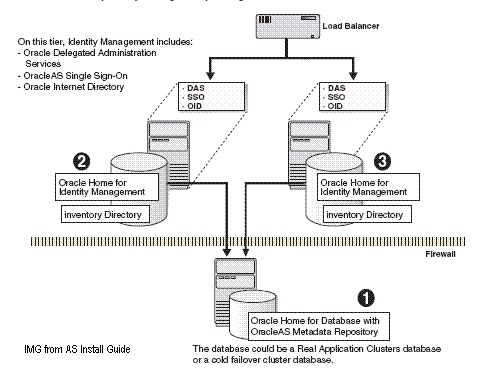
Oracle's Identity Management Components include -
SSO - Oracle Single Sign-On Server
OID - Oracle Internet Directory
DAS - Delegated Administrative Services
DIP - Directory Integration & Provisioning Services
OCA - Oracle Certifying authority (Optional)
I am going to cover them in detail in my future posts, These Services & Component are quite important for Apps DBA as IM (Identity Management) is part of Oracle Apps Release 12.
This post covers overview & important notes w.r.t. to Identity Management Cluster where IM component are in Active Active scenario, which means IM components (OID, SSO, DAS) are available on both nodes for High Availability .
For IM underlying database can be single Instance database or Two or Multiple Instance RAC (Preferably atleast Two Node)
Distributed / Non Distributed IM
Distributed IM means IM components (SSO, DAS, OID) are distributed on more than one machine (SSO & DAS on one machine & OID on second machine).
Non Distributed IM means all IM components are on same machine.
You can cluster both Distributed or Non Distributed Identity Management
Here are few Notes/Checks which I learnt from my various Implementations
Things you should know before starting Installation
- Check if you want Distributed or Non-distributed IM Cluster
- Virtual Name of HTTP Server (Infra for SSO & OIDDAS) and protocol (http or https)
- Virtual Name of OID including port (SSL & NON-SSL, you need both. Default is 389 & 636 resp)
- Communication protocol requirement (HTTP or HTTPS) between
CLIENT -> Load Balancer -> HTTP Server
things you must do before Installing Oracle AS Identity Management Cluster
- synchronize system clock on all server (which are part of cluster) with in 250 second
- set cookie persistence at load balancer specifically for URI /oiddas/ , If your browser doesn't support persistence setting at URI level then set for all HTTP Traffic (Set cookie to expire when browser session expires)
- Before Installing firt OID Node make sure TCP monitoring is not enabled on Load Balancer on first node
- Configure load balancer to return immediately to calling clients
Things/Tips which will be handy for AS Cluster (IM Type)
- For first OID Node Installation, make sure MR is not registered with any OID else it will fail. Installer checks that & if it finds that MR is already registered it assumes first node & asks for first OID node information to make it part of OID cluster
- Choose similar component on other node of cluster (i.e. If node first Node you have OID & DAS then on other Cluster node also Install OID & DAS)
- To access OID on any OID node in cluster , you have to use Password for ias_admin on first installation and not ias_admin password used second , third or further installation of Instance in cluster (oiddas, orasso, oidmon)
- For IM Cluster you always select IM and not IM+MR (This is during Installation Screen)
- For IM content database should already be loaded with Metadata Repository using Repca or MRCA (Repository Creation Assistance or Metadata Repository Creation Assistance)
- Installation steps for first OID Node is different than subsequent Node
- For IM Cluster , never select IM+MR during Installation screen , always select IM only.
- You have to select HA (High Availability) during Installation Options.
More on Indentity Management Cluster Installation..
Enable Apex Applications for SSO authentication ..
Coming soon ....
Now register for E-mail notification via "Email Subsciption" on your right Menu Bar
10g AS Middle tier Cloning & Overview

This post is useful for those who are using 10g Application Server and want to clone 10g Application Server (Portal, BI or Forms and Reports) from Production to Test or Vice Versa.
For cloning Oracle Applications 11i / E-Business Suite check http://becomeappsdba.blogspot.com/search/label/cloning
Key points for cloning 10g Application Server (as of 19 August 2007)
-------------------------------------------------------------------
-You can clone middle tier installation of 10g AS (J2EE & Webcache, Portal & Wireless and BI & Forms)
-You CANNOT clone
----i)Infrastructure Tier (MR & IM)
----ii)OAS Integration, BPEL Process Anaytics or BPEL process manager
----iii) Developer kit and SDK
----iv) Installation that includes workflow
There is manual method to create replica of source instance in to target instance; called as Staging source infrastructure instance to target infrastructure instance.
- Middle tier cloned instance must have different Instance Name than source instance name.
- You can clone MT (Middle Tier) that is member of OracleAS Cluster or Farm but you must remove instance from OracleAS Cluster before beginning cloning operation.
- Middle tier Cloning process does not configure Load Balancer. If you use one, you have to configure it manually including invalidation port
- If in source instance, webcache is member of cache cluster, then target webcahe should be manually added in to cache cluster (or delete other cache cluster member info manually if you don't wish to target cloned instance as cache cluster)
-During 10g AS middle tier cloning, source ORACLE_HOME is copied to destination ORACLE_HOME , then a set of scripts is used to update information in key configuration files of oracle application server middle tier (like hostname).
Oracle 10g AS Middle Tier cloning process
--------------------------------------------------------------
i) On source instance run prepare_clone.pl (in $OH/clone/bin) (This script parses files, create archives using DCM, backs up required files, and run wireless clone assistant if wireless is enabled)
ii) Copy ORACLE_HOME to destination location
iii) On target instance run clone.pl (this step invokes OUI which repeats all actions done during source instance installation)
iv) In post clone phase, clone.pl also does following post clone steps to make target cloned instance to a working state. These are
---a) setting new ORACLE_HOME in DCM
---b) update configuration file
---c) calls chgiphost command to change hostname and IP address in cloned instance
---d) If source instance was connected to OID (Portal/BI) then add information about clone in OID
v) After cloning and starting services on target instance on unix you have to run root.sh (from root user)
I hope by now its clear to you that cloning of middle tier on 10g Application Server is still not as mature as cloning Apps/E-Business Suite (11i or R12).
In coming post I'll cover creating replica or staging 10g Application Server (Portal or BI) production instance to test instance so that users/groups, portal, BI, SSO and DAS data can be migrated from source instance to target instance for as close as possible copy of production instance.
Related
Labels: 10gAS
Cloning 10g AS
This is second post w.r.t. cloning Oracle 10g Application Server. For first post on overview of 10g Application Server Middle Tier cloning visit http://becomeappsdba.blogspot.com/2007/08/cloning-staging-oracle-10g-application.html
This post covers basic understanding of staging (cloning) 10g Application Server both infrastructure and middle tier.
This post covers basic understanding of staging (cloning) 10g Application Server both infrastructure and middle tier.
Assumptions with this cloning
---------------------------------------------
1. You have 10g Application Server Middle Tier (Portal or BI type) and Infrastructure tier (OID, SSO, MR)
2. You have source instance (PROD) which you wish to clone to target instance (DEV/Test)
Broad Level Steps
--------------------------
A. Export Data from source Instance
1. Install Target Instance (Dev/Test) Infrastructure tier (Try to keep same OID realm as source instance prod)
2. Export User data from source OID Instance (using ldifwrite)
3. Export Group data from source OID Instance (using ldifwrite)
4. Export DAS data from source OID Instance (using ldifwrite )
5. Copy password file from source OID using ldap search command (Do this step if you want to retain similar password policy on target instance as source)
6. Export portal, portal_app, portal_public, discoverer5 and various other custom schemas from source instance
7. Export SSO data using ssomig utility from source instance
8. Export EUL (End User Layer) discoverer data from source using eulapi
B. Install Target Instance
1. Install Infrastructure tier (Keep OID realm similar to source instance)
2. Install Middle Tier
C. Clean/Clear/Delete Target Instance Data
1. Delete Users/Groups from target Instance using bulkdelete.sh (OID script)
2. Drop portal, portal_public, discoverer5 and various other schemas
D. Load data from source to target Instance
1. Load User/Groups from source to target using bulkload.sh (OID script)
2. Import SSO data using ssomig utility with option -import
3. Create portal & portal_public user using script wdbisys.sql & cruser.sql resp.
4. Create discoverer5, portal_app and various other custom schema
5. Import portal and other schema data using database IMP
6. Create any custom OC4J and deploy application from source to target instance
7. Import EUL data using eulapi
For step by step procedure on creating replica / clone of 10g Application Server Production Instance to Test Instance visit
http://download.oracle.com/docs/cd/B14099_19/core.1012/b13995/prodtest.htm#CHDHBJCH
Issue in Documentation : Oracle Document mentioned above doesn't cover discoverer5 schema import/export so if you hit any issues with discoverer import discoverer5 schema
Cloning E-Business Instance integrated with 10g AS Portal,Discoverer, OID and SSO coming soon ...
Labels: 10gAS
OID Overview
OID which stands for Oracle Internet Directory is part of Identity Management in Infrastructure Tier of Fusion Middleware. If you are planning to configure 10g Application Server with Apps 11i or R12 , This node might be useful for you in understanding OID . Looking at importance of OID, I am going to discuss on few important things about OID today .
OID is installed on infrastructure tier in 10g Application Server (If you want to learn basic components of Application Server you can visit my previous post at Industry has started talking about Fusion Middleware & Oracle recently certified 10g Application Server (Portal 10.1.4) with Oracle E-Business Suite so I am discussing overview of Application Server part of Fusion Middleware Family.
Overview of 10g Application Server
10g Application Server Consist of Infrastructure Tier & Middle Tier
What is Infrastructure Tier ?
Infrastructure Tier provides Infrastructure Services to 10g Application Server & consist of following technical components
- Database -> To Store User/Applications Identity Data (Portal,Wireless,OID data)
- OID -> Oracle Internet Directory, to store User Credentials, Schema passwords, Application details & lot more ...
- HTTP Server -> This Web Server (OHS, Oracle HTTP Server) on Infra Tier is used to access SSO (Single Sign-On Server) & OIDDAS (OID Delegated Administrative Services)
- OC4J -> Oracle Container for J2EE (OC4J_Security for SSO), You have additional OC4J_OCA if you have OCA (Oracle Certifying Autority). OCA is Optional component in Infrastructure Tier
What is Middle Tier ?
Middle Tier is tier where application Server & applications logic resides. It consist of following Technical Components
- HTTP Server -> This OHS (Oracle HTTP Server) is separate from above OHS & this is OHS from where users access application Server like portal, wireless, j2ee
- OC4J -> These are container which provide place holder for j2ee or web applications . Applications are deployed on OC4J's. 10g AS comes with default OC4J name "home", you create more OC4J depending on your requirement
- Web Cache -> Web Cache acts as cache for fast response to web server.
Logical Services for Infrastructure Tier
Above was technical components of Infrastructure Tier , Logically Infrastructure Tier consist of Two main categories which are
Identity Management
&
Metadata Repository
What is Metadata Repository ?
MR is similar to Database Metadata & MR you can further classify as
Metadata repository for Products (Like Portal, Wireless, BI) This MR usually is user data. Lets assume I created some pages, documents in Portal or User entered some data in any application , such data when stored in database is called as Product MR
MR for OID - Oracle Internet Directory contain some data & data related to this , one can classify as MR for IM (as OID is part of Identity Management - discussed later)
MR for SSO - Oracle Single Sign-On data & schema definitions , one can classify as MR for IM (as SSO is part of IM)
So broadly there are three kind of MR (that's how I classify MR)
What is Identity Management ?
Logical Grouping of Services which help in Managing Identity is called as Identity Management.
Identity management Consist of following Services like (Discussed later in Detail)
- OID Oracle Internet Directory
- DAS Delegated Administrative Services
- DIP Directory Integration & Provisioning Services
- SSO Single Sign-On Service
- OCA Oracle Certifying Authority
what's is OID ?
Oracle Internet Directory (OID) is Oracle's Implementation of LDAP (Light weight Directory Access Protocol) which is ldap version 3 compliant. OID is special kind of database repository in which information is stored in Tree structure also called DIT (Directory Information Tree).
Similar to OID , Microsoft has its own LDAP server called Active Directory (AD) and Sun's LDAP server is called as iPlanet .
Where is OID code in oracle_home ?
OID code & its corresponding log files are stored in directories under $ORACLE_HOME/ldap directory in Infrastructure Tier . This is same tier where your SSO server sits.
OID logs are stored at $ORACLE_HOME/ldap/log (This location is quite important for apps dba's for troubleshooting OID Issues). Few executables like oidctl, oidadmin, oidca, oidldapd are in ORACLE_HOME/bin .
What are default ports for OID ?
You may see different ports for OID depending on OID server version but most common is 389 non ssl OID port & 636 for SSL OID port (These are also default ldap server ports). If you don't know which ports your OID is using refer portlist.ini in $ORACLE_HOME/install (Note that this file will not list updated port if you change OID ports after Installation)
You should an entry like
Oracle Internet Directory port = 389
Oracle Internet Directory (SSL) port = 636
How to start OID ?
OID process is controlled by opmn (Oracle process monitor & notification server) so you by default use opmnctl command
To Start OID opmnctl startproc ias-component=OID
To Stop OID opmnctl stopproc ias-component=OID
OID can also be started without OPMN by
First start oidmon (OID Monitor Process)
Then use oidctl (OID control)
To stop OID without OPMN
First stop oid process using oidctl then stop oidmon (OID monitoring process)
When you start services using opmnctl , it inturn start oidmon & oidctl .
How to troubleshoot OID issues ??
Where to check for OID Logs ??
What is OID Replication Server ??
What is Integration & Provisioning Server in OID ??
Coming soon .....
Single Sign-On Overview
Today lets discover Single Sign-On (SSO) like why its used , advantages of using it , what all different type of applications can use SSO including technical details of SSO .
What is Single Sign-On Server (SSO) ?
As name says Single-Sign On Server is set of services (Software) which enables login to Application once which will allow you to login to Ppartner Applications with no need to login again. Lets assume I have configured single SSO Server for Portal , E-Business Suite, Collaboration Suite plus some other other applications, Now if I login to any one of them & after that if I wish to login to other applications I should be able to login without supplying passwords again.
How will I log off then ?
This is called as Single Sign-Off which is part of SSO server , If you logout from any one application SSO server will log off from all applications.
What are Technology Stack components of SSO Server ?
SSO consist of OC4J_Security & HTTP Server which are part of Oracle Identity Management which inturn part of Oracle Infrastructure Server which in turn part of Oracle Application Server. SSO server uses Oracle Internet Directory to store User Credentials in encrypted format for Partner Applications . If some one ask you to bounce SSO server , you bounce either of them or both . Oracle components uses mod_osso which is part of Oracle HTTP Server to connect to SSO server.
Partner Application & External Applications ?
As mentioned above lot of time about Partner Applications ; Partner Applications are the one which delegates their authentication to SSO server (like Portal, Discoverer, E-Business Suite, Collaboration Suite) where as External Applications are applications which don't delegate their authentication to SSO Server (like yahoo, google, hotmail applications).
What does delegating Authentication means here ? Delegating authentication means partner application will ask sso to verify if a user is authenticated properly or not where as external application will check username/password at their end sso server will simply hold username/password in OID (If users select remember external application password)
Request Flow when SSO is used ...
Very important to understand request flow when a application is configured with SSO & user tries to access Application .
1) User first time tries to access application (like portal, collabsuite, apps 11i) configured with sso server
2) Application checks that there is no login cookie set into User(Clients) browser so Application redirects it to Single Sign-On Server via mod_osso
3) Single Sign-On Server returns login page to user & user enter his/her username/password
4) SSO validates these password against one stored in Oracle Internet Directory
5) If password matches then SSO return a token to client with list of all applications which user has access and return client back to original application
6) This token is stored as part of cookie in user's/client's browser & further connections from client to applications will be allowed (as authentication token is already in cookie)
Do you know how to access Single Sign-On server from browser or what is SSO URL ?
Lot more on OID & Identity Management including IM Cluster coming soon ...
Web Cache Basics
What is Oracle Web Cache ?
Oracle web cache is component of 10g Application Server which is installed by default with Portal & Wireless or BI & Forms type Installation. You can also install standalone webcache for J2ee & webcache applications or to configure webcache with Oracle Applications 11i.
Why I need Web Cache ?
As name suggest web cache act as Cache for Web Servers including Oracle Application Server 9i, 10g to cache frequently used static & dynamic pages. Web Cache is used for increasing response time of your site by caching frequently used partial / full page , images, pdf. Web cache can also act as Software Load balancer or Reverse Proxy Server or Front end to your Applications to Hide server name.
Is Web Cache configurable & Certified with Apps 11i ?
Yes, Web cache can be configured with Apps 11i as reverse proxy server (for security) and Failover & Surge Protection (To minimize downtime) .
*Web Cache can't be used as Load balancer for E-Business Suite as its not possible to set session stickyness in Webcache. (Thanks to Gaurav for pointing this out)
Check Metalink Note 306653.1 Installing and Configuring Web Cache 10.1.2 and Oracle E-Business Suite 11i
How to start / stop webcache ?
To start/stop webcache with 10g AS, use
opmnctl startprocstopproc ias-component=WebCache
For standalone J2ee & Webcache Installation use
webcachectl startstop
How to troubleshoot Webcache Issues ?
Webcache logs are at $ORACLE_HOME/logs event_logs & access_log , all issues errors are recorded in event_logs so check this file any issues related to Webcache .
Start/Stop 10g AS
Last month I discussed about 10g Application Server which is going to replace 9i AS (1.0.2.2.2) in Oracle applications Rel 12 (Next version of Oracle Apps 11i). You can check overview & Installation Document in below links
Industry has started talking about Fusion Middleware & Oracle recently certified 10g Application Server (Portal 10.1.4) with Oracle E-Business Suite so I am discussing overview of Application Server part of Fusion Middleware Family.
Overview of 10g Application Server
10g Application Server Consist of Infrastructure Tier & Middle Tier
What is Infrastructure Tier ?
Infrastructure Tier provides Infrastructure Services to 10g Application Server & consist of following technical components
- Database -> To Store User/Applications Identity Data (Portal,Wireless,OID data)
- OID -> Oracle Internet Directory, to store User Credentials, Schema passwords, Application details & lot more ...
- HTTP Server -> This Web Server (OHS, Oracle HTTP Server) on Infra Tier is used to access SSO (Single Sign-On Server) & OIDDAS (OID Delegated Administrative Services)
- OC4J -> Oracle Container for J2EE (OC4J_Security for SSO), You have additional OC4J_OCA if you have OCA (Oracle Certifying Autority). OCA is Optional component in Infrastructure Tier
What is Middle Tier ?
Middle Tier is tier where application Server & applications logic resides. It consist of following Technical Components
- HTTP Server -> This OHS (Oracle HTTP Server) is separate from above OHS & this is OHS from where users access application Server like portal, wireless, j2ee
- OC4J -> These are container which provide place holder for j2ee or web applications . Applications are deployed on OC4J's. 10g AS comes with default OC4J name "home", you create more OC4J depending on your requirement
- Web Cache -> Web Cache acts as cache for fast response to web server.
Logical Services for Infrastructure Tier
Above was technical components of Infrastructure Tier , Logically Infrastructure Tier consist of Two main categories which are
Identity Management
&
Metadata Repository
What is Metadata Repository ?
MR is similar to Database Metadata & MR you can further classify as
Metadata repository for Products (Like Portal, Wireless, BI) This MR usually is user data. Lets assume I created some pages, documents in Portal or User entered some data in any application , such data when stored in database is called as Product MR
MR for OID - Oracle Internet Directory contain some data & data related to this , one can classify as MR for IM (as OID is part of Identity Management - discussed later)
MR for SSO - Oracle Single Sign-On data & schema definitions , one can classify as MR for IM (as SSO is part of IM)
So broadly there are three kind of MR (that's how I classify MR)
What is Identity Management ?
Logical Grouping of Services which help in Managing Identity is called as Identity Management.
Identity management Consist of following Services like (Discussed later in Detail)
- OID Oracle Internet Directory
- DAS Delegated Administrative Services
- DIP Directory Integration & Provisioning Services
- SSO Single Sign-On Service
- OCA Oracle Certifying Authority
Explanation of these Services, why they are required & one example of all these services ..
Plus how to Install 10g Application Server , Where to find Document .....
Coming in Future Posts...
Imp. Note:
Few of you subscribed to email Notification but didn't confirm for this service from Inbox, Click on Verify Link in Inbox/Junk folder else you will not receive mail about new port in your Inbox. For those who are not aware of this , check bottom of this post.
========
Yesterday we discussed about Overview of 10g Application Server (Fusion middleware), If you missed that post you can now check it at
http://becomeappsdba.blogspot.com/2006/10/fusion-middleware-10g-application.html
If you don't understand what is OID, OIDDAS, DIP, SSO, MR or any other component at this minute don't worry . I'll discuss about them in future in detail.
Overview of 10g Application Server Installation
-- infrastructure & Middle Tier Should (MUST) be isntalled under separate Oracle Homes. Though they can be on Same Physical Machine or on different Machines
-- First you have to install Infrastructure Tier then only you can install Middle Tier
-- You can install Portal/Wireless or IM Repository in an existing database (Choose RepCA, Repository Creation Assistance tool for this option. If you are new to 10g AS skip this for time being as this is optional feature)
-- Before Installation, Make sure all prereq. are complete (Check installation Document mentioned at bottom of this page)
-- You can use eDelivery.oracle.com for software or use link http://www.oracle.com/technology/software/htdocs/devlic.html?=/technology/software/products/ias/htdocs/101202.html (Choose right version, suggestion 10.1.2.0.2 if this is Test as E-Business Suite is certified with Portal Version 10.1.4 )
-- For Portal 10.1.4 , you need 10.1.2.0.2 & then Upgrade portal to 10.1.4 (P.S. Portal version is different than Application Server Version)
Options in Installation
While Installing Infrastructure Tier, you will get three options
- Identity Management & Metadata Repository
- Identity Management only
- Metadata Repository only
If you are new select option 1 i.e. IM+MR as option 2 & 3 are for advanced configuration like Infrastructure on Multiple Machines
While Installing Middle Tier, you will again get three options
- J2ee & Webcache
- Portal & Wireless
- Business Intelligence & Forms
BI & Form type Installation include first two options so this selection will include all J2ee, Webcache, Portal, Wireless, BI & Forms
Portal & Wireless include first option so this selection will include J2ee, Webcache, Portal, Wireless
J2ee & Webcache will install only j2ee & webcache. So if you are not aware of at this minute what you want better select option three i.e. Business Intelligence & Forms
Installation Document mentioned below should be enough, if not leave comments & I'll post step by step installation of 10g Application Server.
It takes 5-6 hours installing 10g AS depending on your Server Capacity.
Installation Document
Installation Document from oracle for Application Server version 10.1.2.0.2 is available at
http://download-uk.oracle.com/docs/cd/B14099_19/getstart.htm . Select as per your Operating System
Now you can subscribe Email Notification For New Post on this Site
--Check on right Menu Bar of Page under E-mail Subscription enter your email ID
--click on "subscribe".
--It will open new window to verify (If pop up blocker is enabled , allow for this session)
--You have to type text message displayed on pop up window
--"click on complete subscription".
Final step is to Verify in your mail box that you only asked for Subscription.
Go to your inbox , you should see a mail with Subject "Activate your Email Subscription to:.. "
Open that mail & click on link
like http://www.feedburner.com/fb/a/emailconfirm?id=329104
If you don't see this mail in your inbox then check your Junk eMail Folder
Click on this link
Today I am going to continue with 10g Application Server Startup Shutdown Scripts. If you understand 10g AS architecture which consist of
infrastructure Services (Database & Identity Management)
&
Middle tier Services (Portal & Wireless or BI & Forms)
I am focusing on these two type of Installation & not j2ee & webcache type (which is third middle tier Installation type) in this discussion.
Startup Sequence
As in apps you follow order (first start database & then middle tier services in 10g AS also you follow similar sequences) Order of startup Services in 10g AS should be like
--Start Database Listener
-- Start Database
-- Start Infrastructure Services
-- Start Middle Tier Services
Shutdown Sequence
-- Shutdown Middle Tier Services
-- Shutdown Infrastructure Services
-- Stop Database
-- Stop database listener
What utility I should use to startup / shutdown (Bouncing) for 10g AS ?
You can use iasconsole (Browser based console listening in default port 1156) to startup shutdown services
You can also use opmnctl ; command line tool (Oracle Process Management & Notification) control to startup shutdown services
dcmctl utility to start/stop services is now deprecated & should not be used
Lets look at scripts once again
Startup
Start listener as - lsnrctl start [listener_name]
Start Database as - sqlplus "/as sysdba"; SQL> startup
Start Infrastructure Services as - opmnctl startall (Make sure your are in Infra Home)
Start Middle Tier Services as - opmnctl startall (Make sure your are in Middle Tier Home)
Shutdown
Stop Middle Tier Services as - opmnctl stopall (Make sure your are in Middle Tier Home)
Stop Infrastructure Services as - opmnctl stopall (Make sure your are in Infra Home)
Stop Database as - sqlplus "/as sysdba"; SQL> shutdown immediate
Stop listener as - lsnrctl stop [listener_name]
How to start/stop iasconsole ?
As I mentioned above you can start/stop services using iasconsole but before that you have to start / stop iasconsole itself which you can do by emctl (em - enterprise manager)
emctl start iasconsole
emctl stop iasconsole
You can access ias console screen from browser by url
http://host.domain:em_port/emd (Default em port is 1156)
http://host.domain:1156/emd (This will prompt username password , use ias_admin)
How to start individual component ?
Step mentioned above are to stop/start all components in Middle Tier or Infrastructure Tier , what if I want to start/stop/restart only few components of a Tier ? You will use
opmnctl [startproc stopproc restartproc] ias-component=[component_name]
or
opmnctl [startproc stopproc restartproc] process-type=[process_name]
Where Component Name like - OC4J, OID, HTTP_Server, WebCache and
Process Type like - WebCacheAdmin, OC4J_Portal, OC4J_Security
How to troubleshoot SSO Server ...
How to change hostname/domainname of Apps 11i Server ...
....Coming soon....
Leave your comments for topics you want to learn/hear/discuss
Installing 10g AS
Imp. Note:
Few of you subscribed to email Notification but didn't confirm for this service from Inbox, Click on Verify Link in Inbox/Junk folder else you will not receive mail about new port in your Inbox. For those who are not aware of this , check bottom of this post.
========
Yesterday we discussed about Overview of 10g Application Server (Fusion middleware), If you missed that post you can now check it at
Industry has started talking about Fusion Middleware & Oracle recently certified 10g Application Server (Portal 10.1.4) with Oracle E-Business Suite so I am discussing overview of Application Server part of Fusion Middleware Family.
Overview of 10g Application Server
10g Application Server Consist of Infrastructure Tier & Middle Tier
What is Infrastructure Tier ?
Infrastructure Tier provides Infrastructure Services to 10g Application Server & consist of following technical components
- Database -> To Store User/Applications Identity Data (Portal,Wireless,OID data)
- OID -> Oracle Internet Directory, to store User Credentials, Schema passwords, Application details & lot more ...
- HTTP Server -> This Web Server (OHS, Oracle HTTP Server) on Infra Tier is used to access SSO (Single Sign-On Server) & OIDDAS (OID Delegated Administrative Services)
- OC4J -> Oracle Container for J2EE (OC4J_Security for SSO), You have additional OC4J_OCA if you have OCA (Oracle Certifying Autority). OCA is Optional component in Infrastructure Tier
What is Middle Tier ?
Middle Tier is tier where application Server & applications logic resides. It consist of following Technical Components
- HTTP Server -> This OHS (Oracle HTTP Server) is separate from above OHS & this is OHS from where users access application Server like portal, wireless, j2ee
- OC4J -> These are container which provide place holder for j2ee or web applications . Applications are deployed on OC4J's. 10g AS comes with default OC4J name "home", you create more OC4J depending on your requirement
- Web Cache -> Web Cache acts as cache for fast response to web server.
Logical Services for Infrastructure Tier
Above was technical components of Infrastructure Tier , Logically Infrastructure Tier consist of Two main categories which are
Identity Management
&
Metadata Repository
What is Metadata Repository ?
MR is similar to Database Metadata & MR you can further classify as
Metadata repository for Products (Like Portal, Wireless, BI) This MR usually is user data. Lets assume I created some pages, documents in Portal or User entered some data in any application , such data when stored in database is called as Product MR
MR for OID - Oracle Internet Directory contain some data & data related to this , one can classify as MR for IM (as OID is part of Identity Management - discussed later)
MR for SSO - Oracle Single Sign-On data & schema definitions , one can classify as MR for IM (as SSO is part of IM)
So broadly there are three kind of MR (that's how I classify MR)
What is Identity Management ?
Logical Grouping of Services which help in Managing Identity is called as Identity Management.
Identity management Consist of following Services like (Discussed later in Detail)
- OID Oracle Internet Directory
- DAS Delegated Administrative Services
- DIP Directory Integration & Provisioning Services
- SSO Single Sign-On Service
- OCA Oracle Certifying Authority
Explanation of these Services, why they are required & one example of all these services ..
Plus how to Install 10g Application Server , Where to find Document .....
Coming in Future Posts...
If you don't understand what is OID, OIDDAS, DIP, SSO, MR or any other component at this minute don't worry . I'll discuss about them in future in detail.
Overview of 10g Application Server Installation
-- infrastructure & Middle Tier Should (MUST) be isntalled under separate Oracle Homes. Though they can be on Same Physical Machine or on different Machines
-- First you have to install Infrastructure Tier then only you can install Middle Tier
-- You can install Portal/Wireless or IM Repository in an existing database (Choose RepCA, Repository Creation Assistance tool for this option. If you are new to 10g AS skip this for time being as this is optional feature)
-- Before Installation, Make sure all prereq. are complete (Check installation Document mentioned at bottom of this page)
-- You can use eDelivery.oracle.com for software or use link http://www.oracle.com/technology/software/htdocs/devlic.html?=/technology/software/products/ias/htdocs/101202.html (Choose right version, suggestion 10.1.2.0.2 if this is Test as E-Business Suite is certified with Portal Version 10.1.4 )
-- For Portal 10.1.4 , you need 10.1.2.0.2 & then Upgrade portal to 10.1.4 (P.S. Portal version is different than Application Server Version)
Options in Installation
While Installing Infrastructure Tier, you will get three options
- Identity Management & Metadata Repository
- Identity Management only
- Metadata Repository only
If you are new select option 1 i.e. IM+MR as option 2 & 3 are for advanced configuration like Infrastructure on Multiple Machines
While Installing Middle Tier, you will again get three options
- J2ee & Webcache
- Portal & Wireless
- Business Intelligence & Forms
BI & Form type Installation include first two options so this selection will include all J2ee, Webcache, Portal, Wireless, BI & Forms
Portal & Wireless include first option so this selection will include J2ee, Webcache, Portal, Wireless
J2ee & Webcache will install only j2ee & webcache. So if you are not aware of at this minute what you want better select option three i.e. Business Intelligence & Forms
Installation Document mentioned below should be enough, if not leave comments & I'll post step by step installation of 10g Application Server.
It takes 5-6 hours installing 10g AS depending on your Server Capacity.
Installation Document
Installation Document from oracle for Application Server version 10.1.2.0.2 is available at
http://download-uk.oracle.com/docs/cd/B14099_19/getstart.htm . Select as per your Operating System
10g AS Overview
ndustry has started talking about Fusion Middleware & Oracle recently certified 10g Application Server (Portal 10.1.4) with Oracle E-Business Suite so I am discussing overview of Application Server part of Fusion Middleware Family.
Overview of 10g Application Server
10g Application Server Consist of Infrastructure Tier & Middle Tier
What is Infrastructure Tier ?
Infrastructure Tier provides Infrastructure Services to 10g Application Server & consist of following technical components
- Database -> To Store User/Applications Identity Data (Portal,Wireless,OID data)
- OID -> Oracle Internet Directory, to store User Credentials, Schema passwords, Application details & lot more ...
- HTTP Server -> This Web Server (OHS, Oracle HTTP Server) on Infra Tier is used to access SSO (Single Sign-On Server) & OIDDAS (OID Delegated Administrative Services)
- OC4J -> Oracle Container for J2EE (OC4J_Security for SSO), You have additional OC4J_OCA if you have OCA (Oracle Certifying Autority). OCA is Optional component in Infrastructure Tier
What is Middle Tier ?
Middle Tier is tier where application Server & applications logic resides. It consist of following Technical Components
- HTTP Server -> This OHS (Oracle HTTP Server) is separate from above OHS & this is OHS from where users access application Server like portal, wireless, j2ee
- OC4J -> These are container which provide place holder for j2ee or web applications . Applications are deployed on OC4J's. 10g AS comes with default OC4J name "home", you create more OC4J depending on your requirement
- Web Cache -> Web Cache acts as cache for fast response to web server.
Logical Services for Infrastructure Tier
Above was technical components of Infrastructure Tier , Logically Infrastructure Tier consist of Two main categories which are
Identity Management
&
Metadata Repository
What is Metadata Repository ?
MR is similar to Database Metadata & MR you can further classify as
Metadata repository for Products (Like Portal, Wireless, BI) This MR usually is user data. Lets assume I created some pages, documents in Portal or User entered some data in any application , such data when stored in database is called as Product MR
MR for OID - Oracle Internet Directory contain some data & data related to this , one can classify as MR for IM (as OID is part of Identity Management - discussed later)
MR for SSO - Oracle Single Sign-On data & schema definitions , one can classify as MR for IM (as SSO is part of IM)
So broadly there are three kind of MR (that's how I classify MR)
What is Identity Management ?
Logical Grouping of Services which help in Managing Identity is called as Identity Management.
Identity management Consist of following Services like (Discussed later in Detail)
- OID Oracle Internet Directory
- DAS Delegated Administrative Services
- DIP Directory Integration & Provisioning Services
- SSO Single Sign-On Service
- OCA Oracle Certifying Authority
Explanation of these Services, why they are required & one example of all these services ..
Plus how to Install 10g Application Server , Where to find Document .....
Coming in Future Posts...
Important Note :
Subscribe for Updates Via Email
Now you can subscribe to this Blog via email : Check on right Menu Bar of Page under E-mail Subscription enter your email ID & click on "subscribe". It will open new window to verify (If pop up blocker is enabled , allow for this session)You have to type text message displayed on pop up window , "click on complete subscription".
Final step is to Verify in your mail box that you only asked for Subscription.
Go to your inbox , you should see a mail with Subject "Activate your Email Subscription to:.. "
Open that mail & click on link like
http://www.feedburner.com/fb/a/emailconfirm?id=329104&key=ost3uANgdy6Ryj04asmMUg%3D%3D
If you don't see this mail in your inbox then check your Junk eMail Folder
Relax & you will get notification in your mail box as soon I post new Topic here .
Subscribe to:
Posts (Atom)